
When I was Marketing Director at TECOBI, part of my responsibility was overseeing the Facebook Ads team. Dealerships regularly updated their advertised lease specials, and those changes mattered to the ads we were running for them.
If a dealership replaced a promotion or revised an offer, someone needed to notice and determine whether the corresponding Facebook ads needed to change, too.
The straightforward way to stay informed was to keep visiting dealership websites and checking their specials pages. It worked, but it was repetitive, especially when there were multiple dealerships to monitor.
So I put together a simple workflow using Google Sheets that checked those pages daily and emailed me updates. It helped me identify when a page had changed, but it couldn’t tell me what had changed. I still had to open the website, find the revised offer, and figure out what needed attention.
That workflow served a purpose. But I kept thinking there was a better way to approach the same problem.
Revisiting an old problem
After leaving TECOBI, I decided to revisit the idea as a small proof of concept. My question wasn’t whether I could build a more elaborate website monitor. It was whether I could make the information more useful to someone who actually had to act on it.
Instead of simply reporting that a webpage changed, could a workflow identify the individual lease offers on that page, organize them in a consistent format, compare them against a previous check, and flag which offers deserved a closer look?
For the exercise, I chose two real dealership specials pages: Germain Toyota of Naples and Sarasota Toyota. They provided a useful test because their websites didn’t present lease information in exactly the same way.
The goal was to create a repeatable process, not a polished commercial product. I wanted to see how far I could get with tools that were already accessible: Google Sheets, Google Apps Script, ChatGPT, and Gemini.
Building the workflow with AI as a development partner
I used ChatGPT to help design and write the Google Apps Script code, troubleshoot extraction problems, and iterate as the workflow took shape. I wasn’t asking AI to visit websites and make marketing decisions on its own. I was using it to help build a more structured process.
The script checks the selected dealership pages and extracts the offer details it can reliably identify, such as vehicle model, advertised monthly payment, amount due at signing, lease term when available, and expiration date. It writes those details to Google Sheets, where current and previous results can be compared.
The spreadsheet became the working interface: a dashboard for reviewing offers, supporting tabs for the collected records, and logs for monitoring activity.
In the completed proof of concept, the workflow collected ten lease offers across the two dealerships—five from each. That was enough to test the approach and expose some of the practical challenges.
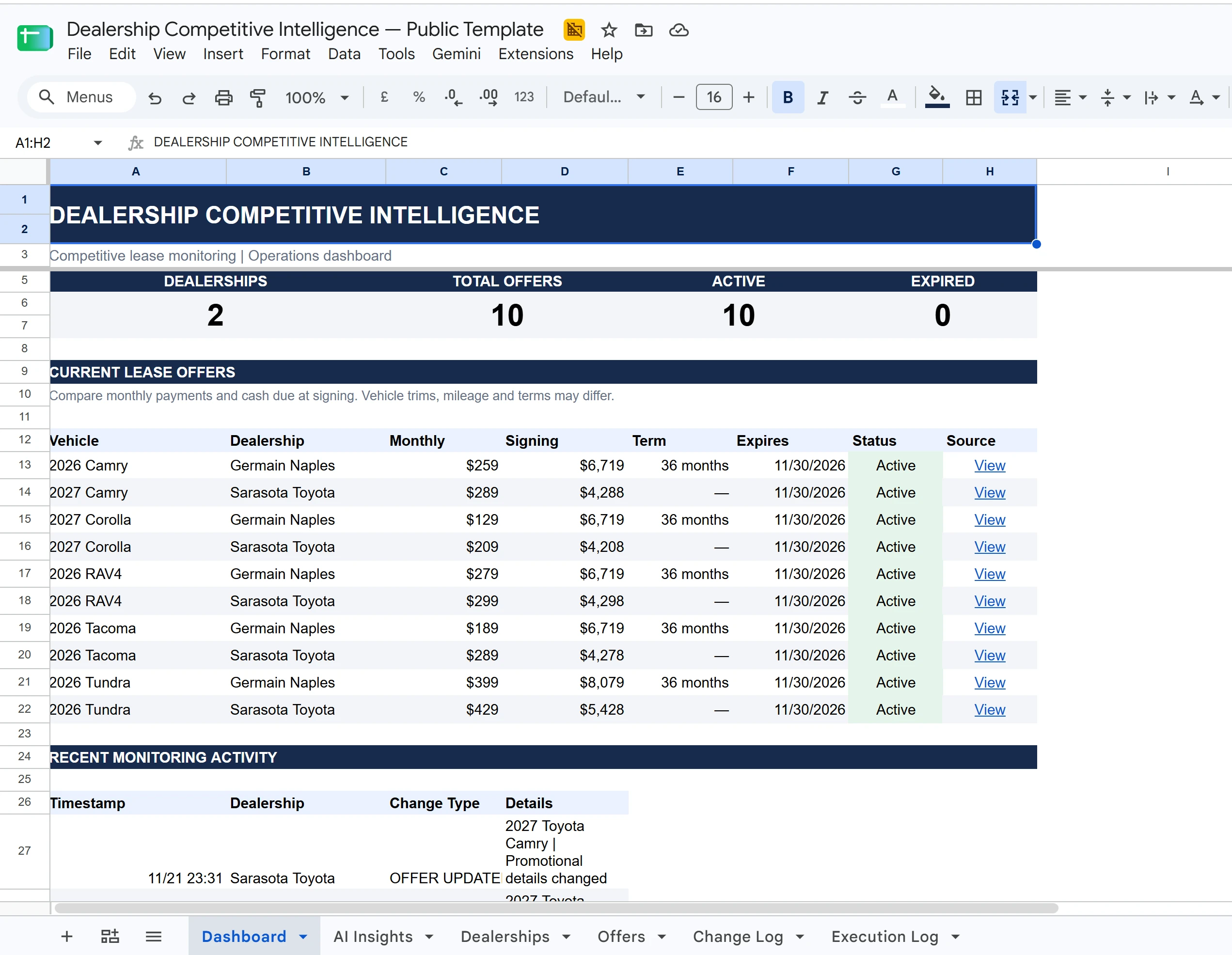
You can explore the view-only Dealership Competitive Intelligence workbook to see how the information is organized. It’s a demonstration of the output, not a ready-to-run copy of the underlying script.
Why I didn’t use generative AI for everything
One of the more interesting decisions was figuring out where AI actually belonged in the process.
Checking a page, extracting known fields, comparing records, and sending an alert are structured tasks. Google Apps Script can handle those without asking a language model to interpret every page on every run.
I used Gemini for a different purpose: generating an on-demand briefing from the information already collected in the spreadsheet. The briefing can summarize the monitored offers, surface comparisons worth investigating, and suggest questions an account manager might want to ask.
That distinction matters to me. The script handles the repetitive collection and comparison. Generative AI helps interpret the results, with the understanding that its observations still need to be checked.
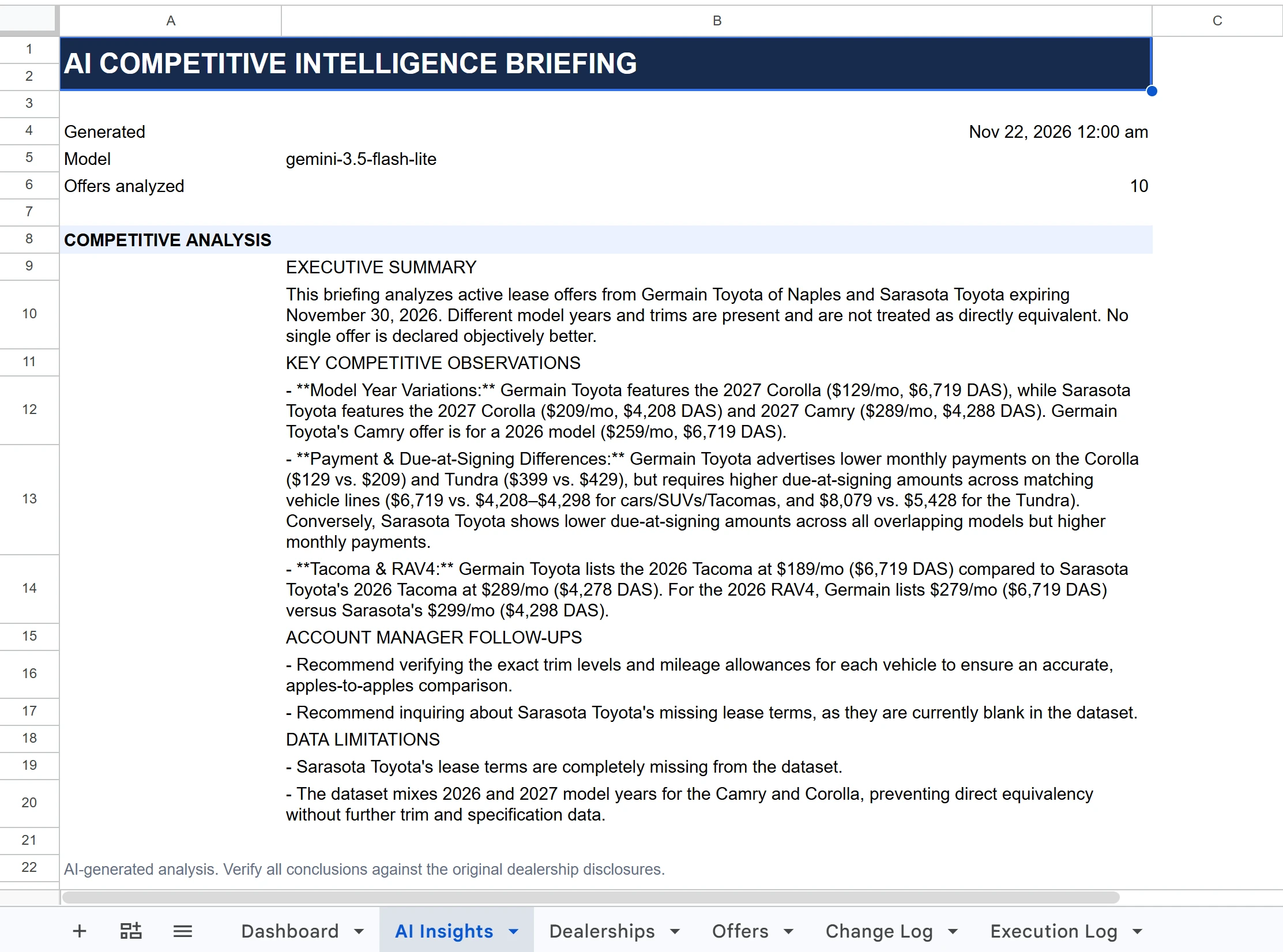
A summary can be useful without being the final authority. For example, a lower advertised monthly payment doesn’t necessarily mean a better lease. The amount due at signing, lease length, mileage allowance, taxes, fees, and eligibility requirements can change the comparison considerably.
Real-world websites aren’t always cooperative
This was probably the most instructive part of the project.
The two dealerships presented their specials differently. Some information appeared in prominent offer cards, while other details were buried in disclosures or presented in ways that were harder to extract consistently.
Sarasota Toyota was a particularly good example. The advertised payments and expiration dates required additional work to identify correctly, and some lease terms weren’t available in the structured output. After several iterations, the workflow captured the November 30, 2026 expiration dates for its five monitored offers, but the missing terms remained missing.
I didn’t want the script—or Gemini—to invent information just to fill a blank cell.
This is also why I wouldn’t describe the proof of concept as a universal scraper. The extraction logic is tailored to the sites being monitored. A dealership redesign, a different page layout, or an offer presented entirely inside an image could require changes to the parser.
The useful lesson wasn’t that AI made messy websites disappear. It was that a working automation needs to account for those inconsistencies and make its limitations visible.
From a page-change alert to an offer-level notification
The original TECOBI workflow answered a simple question: Did something change on this page?
The rebuilt version can answer a more useful one: Which monitored offer appears to have changed?
To test that behavior, I simulated an update to an offer. The resulting email identified the dealership and vehicle involved and directed me back to the dashboard for review.
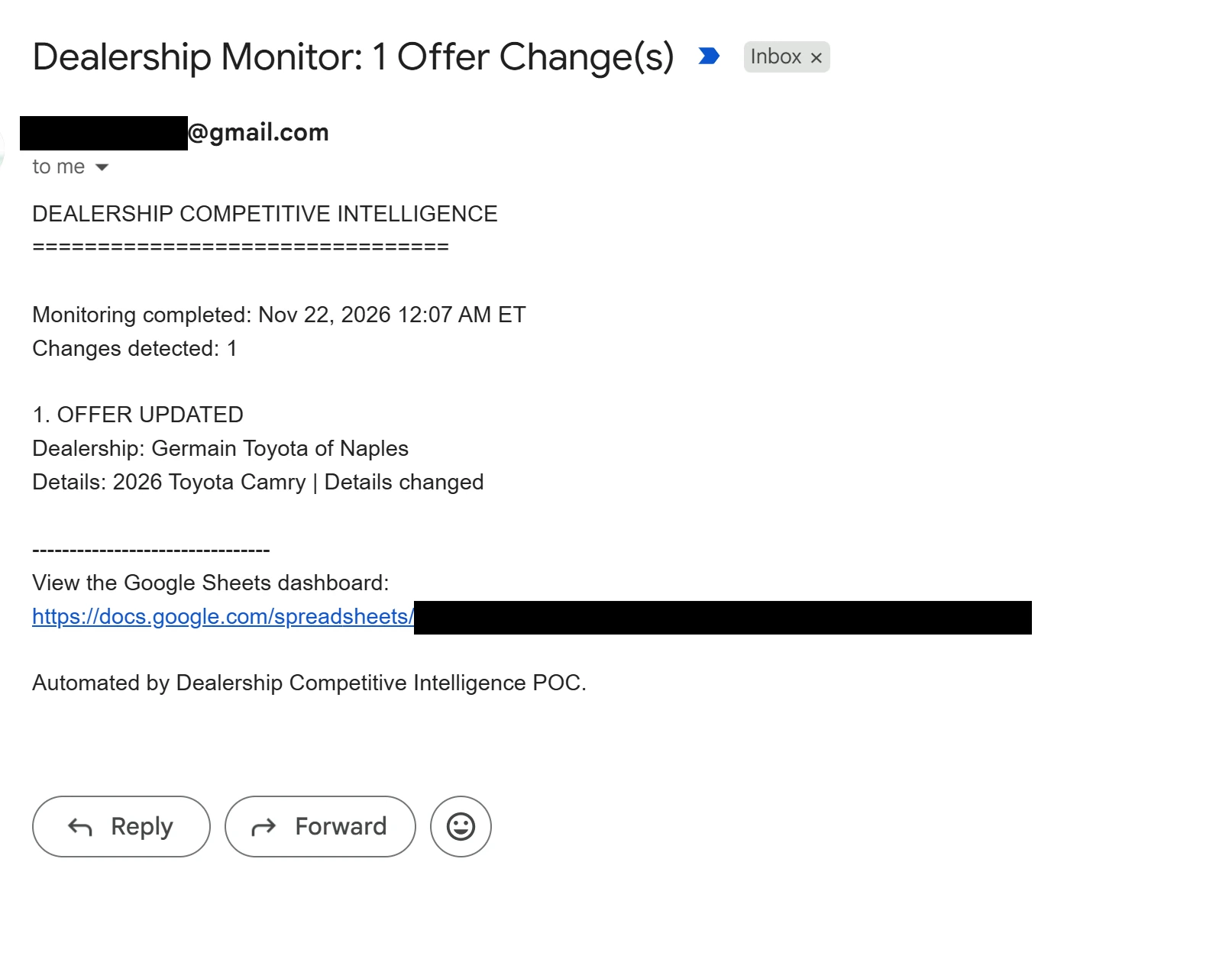
There is an important distinction here: the notification identifies the offer, but it doesn’t yet spell out the exact before-and-after values of every changed field. The email reported that the offer’s details had changed. A future version could make that comparison explicit—for example, identifying a revised monthly payment or expiration date directly in the message.
In normal checks after the test, the workflow retained ten current and ten previous offers and reported no new changes. The monitoring and comparison worked in this limited exercise, but I haven’t measured production reliability or time savings from a live deployment of the rebuilt version.
Where else could this approach be useful?
I built this example around automotive lease specials because I understood the problem from experience. But the same framework could serve several different audiences.
For a dealership marketing team, it could monitor a group of competing dealerships in the same market. Instead of manually visiting each competitor’s specials page, a marketer could review advertised offers in one place, watch for new promotions, and investigate changes that might affect campaign strategy.
For an automotive marketing agency, it could help account managers keep track of clients’ published specials. A change alert could prompt someone to check whether Facebook ads, landing pages, or other promotional materials still reflect the dealership’s current offers. That’s the application closest to my original work at TECOBI.
For a consumer shopping for a vehicle, a simpler version could collect advertised offers from dealerships they’re considering. Seeing monthly payments, amounts due at signing, and available terms side by side could make the research process easier. It wouldn’t automatically identify the best deal, though. A fair comparison would still require checking mileage allowances, total lease costs, taxes, fees, eligibility, and the full dealership disclosures.
Beyond automotive, a retailer could monitor public promotional pricing, a marketer could track changes to competitors’ landing pages, or a business development team could watch publicly advertised offers in its industry.
The common thread is a recurring research task built around information that changes over time. The value comes from making those changes easier to notice and evaluate—not from removing the person who has to make the decision.
What I’d improve before using it in a live environment
If I were putting this into regular use for an agency or dealership, I’d spend more time on reliability and usability before adding features.
I’d want clearer before-and-after details in notifications, more robust handling of site redesigns and missing fields, and a way to distinguish meaningful offer changes from formatting differences. I’d also want stronger validation against original offer disclosures and a practical process for reviewing extraction errors.
Scheduling is supported by the Apps Script approach, but I left recurring monitoring disabled for this portfolio exercise. This is a proof of concept using publicly displayed offers, not a continuously operated competitive intelligence service.
Those boundaries are worth stating. Ten offers across two websites demonstrate a useful pattern; they don’t prove that the same implementation will work unattended across hundreds of dealerships.
What I took away from the project
What I like about this project is that the starting point wasn’t AI. It was a familiar marketing operations problem I’d already tried to solve once.
ChatGPT helped me build and refine the code. Google Apps Script handled the repetitive work. Google Sheets made the results visible and reviewable. Gemini added a layer of interpretation when I wanted a briefing rather than another table.
Each tool had a specific job.
The original workflow told me that something had changed. The rebuilt version brought me closer to knowing which offer needed attention. That’s not the end of the process, but it’s a meaningful improvement in how the information reaches the person responsible for acting on it.
If you’d like to see the output, the public, view-only workbook is available here. And if you’re considering a similar workflow for a different business, the more useful starting question might be: What information are we repeatedly checking, and what decision are we trying to make when it changes?